

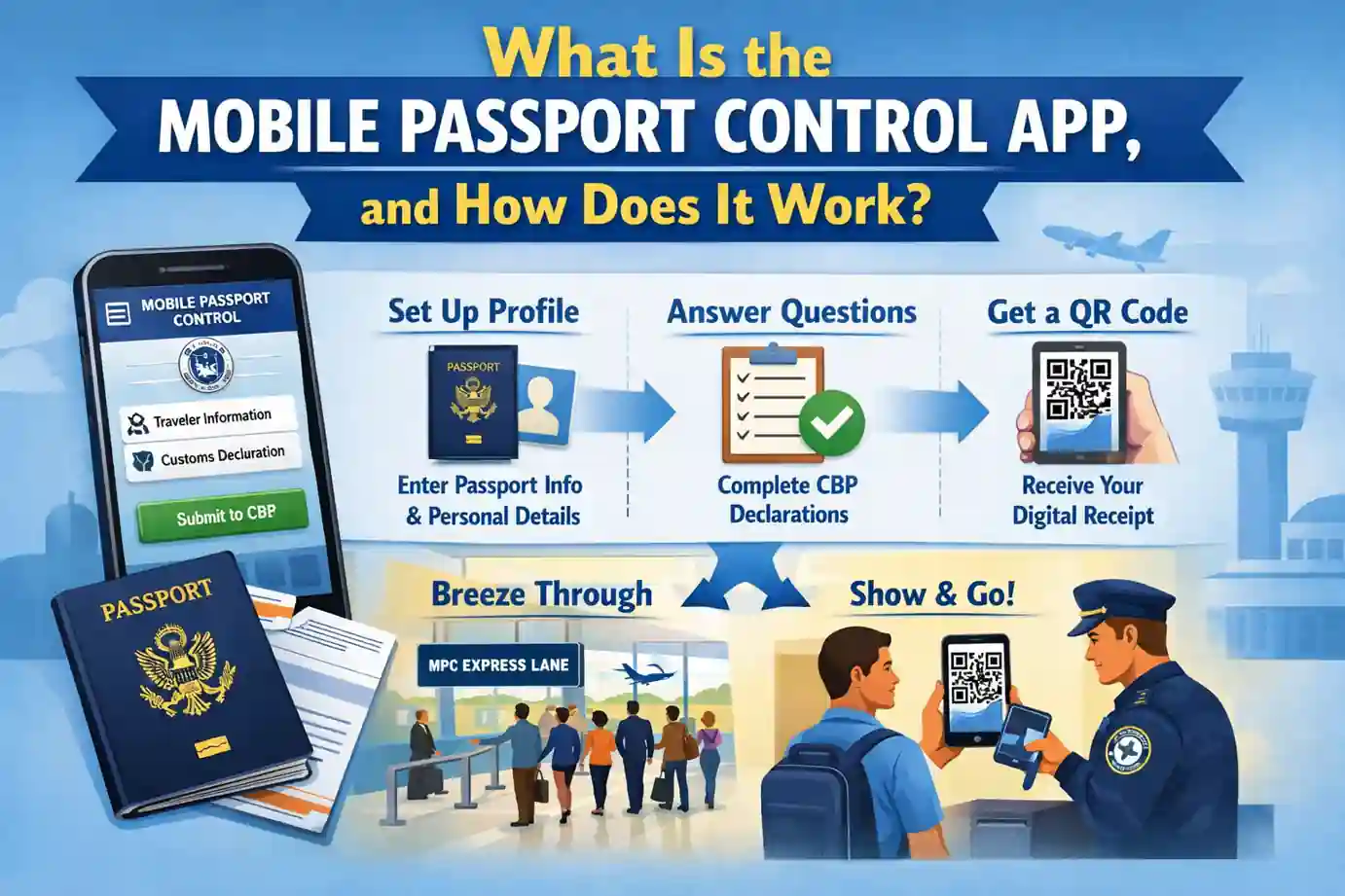

Flying back into the United States after an international trip should be exciting. But let’s be honest – standing in long immigration lines can drain that post-vacation glow pretty quickly. If you’ve ever watched enviously as travelers breeze through a special line while you’re stuck waiting, you’ve probably seen the Mobile Passport Control App in action.
Here’s the good news: you can be one of those breezing-through travelers, and it won’t cost you a penny.
What Is the Mobile Passport Control App?
The mobile passport control app is a free smartphone application created by U.S. Customs and Border Protection (CBP) that speeds up the immigration process for U.S. citizens and Canadian visitors returning to the United States. Think of it as a digital customs declaration form that you fill out before you even land.
Instead of filling out paper forms on the plane and standing in the regular passport control line, you submit your information through your phone and use a dedicated lane at the airport. The mobile passport control CBP app has been helping international travelers save time since 2014, and it keeps getting better.
How Does the Mobile Passport Control App Work?
Understanding how the mobile passport control app works is simple. The process happens in two main phases: before you land and when you arrive at the airport.
Before You Land
Once your plane has Wi-Fi or you’re within range of U.S. cell towers, you can start the process:
- Open the app on your smartphone or tablet
- Create a profile with your passport information (you only do this once)
- Take a selfie that the app will use for verification
- Answer customs questions about what you’re bringing into the country
- Submit your declaration and receive a QR code
The whole process takes about two minutes. You can do it while you’re still flying over the ocean or sitting on the tarmac.
At the Airport
When you arrive at a participating airport:
- Look for Mobile Passport Control signs – they’re usually near the regular immigration lines
- Show your passport and QR code to the CBP officer
- Answer any additional questions if needed
- You’re done – head to baggage claim
That’s it. No paper forms. No waiting in the regular line. Just a quick verification and you’re on your way.
Mobile Passport Control App Benefits
Why should you download and use this app? The mobile passport control app benefits go beyond just saving time:
Skip the Long Lines
The biggest advantage is obvious: faster airport entry. Mobile Passport Control users typically spend 20-40% less time in immigration compared to regular lines. During peak travel times, this could save you an hour or more.
Completely Free
Unlike Global Entry, which costs $100 and requires an in-person interview, Mobile Passport Control is free. Zero application fees. Zero membership costs. Zero renewal charges. You just download the app and start using it.
Easy Family Travel
Families can submit one declaration together. One person can create a profile for their entire household and submit everyone at once. This makes mobile passport control for US citizens traveling with kids incredibly convenient.
No Interview Required
With Global Entry, you need to schedule and attend an interview at an enrollment center, which can take months. With Mobile Passport Control, you download the app, and you’re ready to go. There’s no approval process or waiting period.
Works on both iOS and Android
The mobile passport control app download is available on both Apple and Android devices. You can find it in the App Store or Google Play Store.
Mobile Passport Control App Requirements
Before you download the app, make sure you meet these criteria:
Eligibility Requirements
- You must be a U.S. citizen or a Canadian visitor
- You must have a valid passport
- You must be arriving by air at a participating airport
- You need a smartphone or tablet with a camera
That’s it. No background check. No fingerprints. No interview. If you have a U.S. passport and a smartphone, you qualify.
What You’ll Need to Use the App
When setting up your profile, have these items ready:
- Your valid U.S. passport
- Your flight information
- Information about items you’re bringing into the country
- A front-facing camera for your selfie
The app stores your passport information securely on your device, so you only enter it once. After that, you just update your travel details each trip.
Mobile Passport Control Supported Airports
The mobile passport control supported airports list keeps growing. As of 2024, the app works at dozens of major U.S. airports and cruise ports. Here are the major hubs:
Major Airports with Mobile Passport Control
- East Coast: Newark (EWR), JFK (New York), Boston (BOS), Philadelphia (PHL), Miami (MIA), Fort Lauderdale (FLL), Orlando (MCO), Atlanta (ATL), Washington Dulles (IAD)
- West Coast: Los Angeles (LAX), San Francisco (SFO), San Jose (SJC), Seattle (SEA), Portland (PDX), San Diego (SAN)
- Central: Chicago O’Hare (ORD), Houston Bush (IAH), Dallas/Fort Worth (DFW), Phoenix (PHX), Minneapolis (MSP)
- Other Major Cities: Denver (DEN), Las Vegas (LAS), Salt Lake City (SLC), Detroit (DTW), Tampa (TPA)
Cruise Ports
The app also works at several cruise ports, including:
- Miami
- Fort Lauderdale
- Port Canaveral
- Galveston
- Baltimore
For the complete mobile passport control app airports list, check the CBP website. They regularly add new locations based on passenger volume and demand.
Mobile Passport Control vs Global Entry: Which Is Better?
This is the million-dollar question – or rather, the hundred-dollar question, since that’s what Global Entry costs.
When Mobile Passport Control Wins
Mobile Passport Control is better if you:
- Don’t want to pay $100
- Travel internationally only occasionally (once or twice a year)
- Don’t want to wait for an interview appointment
- Only care about air travel into the U.S.
- Are you comfortable using your phone at the airport
The mobile passport control wait times at most airports are significantly shorter than regular immigration lines, though slightly longer than Global Entry lanes.
When Global Entry Wins
Global Entry is better if you:
- Travel internationally frequently (monthly or more)
- Want TSA PreCheck included (it comes with Global Entry)
- Want to use the fastest possible lane (Global Entry is usually quicker)
- Travel to other countries with Trusted Traveler programs
- Drive across the Canadian or Mexican border often
Think of it this way: Mobile Passport Control gets you through immigration in 5-15 minutes instead of 30-60 minutes. Global Entry gets you through in 2-5 minutes. Both are huge improvements over the regular line.
Can You Use Both?
Yes! If you have Global Entry, you can still download Mobile Passport Control as a backup. Some travelers prefer using Mobile Passport Control because it allows families to submit together, while Global Entry processes each person individually.
How to Use Mobile Passport Control at US Airports: Step-by-Step Guide
Let me walk you through the entire process from download to clearing customs.
Step 1: Download and Install
Search for “Mobile Passport Control” in your app store. The official app is published by Airside Mobile. Download the mobile passport control app to your phone.
Step 2: Create Your Profile
Open the app and tap “Get Started.” You’ll need to:
- Enter your passport details (number, expiration date, etc.)
- Take a clear photo of your passport information page
- Take a selfie for identity verification
- Enter basic information (name, date of birth, address)
This takes about five minutes the first time. After that, your information is saved.
Step 3: Add Family Members (Optional)
If you’re traveling with family, add their profiles too. You can submit declarations for up to 12 people traveling together on the same flight.
Step 4: Before Landing, Start Your Declaration
When you’re within an hour of landing (and have internet access), open the app and start a new declaration:
- Select your arrival airport
- Enter your flight number
- Answer the customs questions (same ones as the paper form)
- Review and submit
The app generates a QR code that’s valid for four hours.
Step 5: At the Airport
Look for the Mobile Passport Control signs when you deplane. These are separate from the regular immigration lines but not always as clearly marked as you’d hope. Don’t be shy about asking an airport employee where to go.
When you reach the officer:
- Have your physical passport ready
- Show the QR code on your phone
- Answer any questions the officer asks
- Proceed to baggage claim
Step 6: Retrieve Your Bags and Exit
Once you’re through passport control, grab your bags and head for the exit. If Customs wants to inspect your luggage, they’ll direct you to secondary screening. Otherwise, you’re free to go.
Tips for Using Mobile Passport Control
After helping thousands of travelers optimize their airport experience through our mobile app development company in USA, we’ve learned what works best:
Do This:
- Download the app before your trip – Don’t wait until you’re on the plane
- Update your passport info if you renew – The app won’t work with an expired passport
- Charge your phone – Make sure you have enough battery to display the QR code
- Take a screenshot of your QR code – Just in case you lose internet connection
- Look for signs – Mobile Passport Control lanes aren’t always obvious
- Have your physical passport – You still need the actual document
Don’t Do This:
- Don’t fill it out too early – The QR code expires after four hours
- Don’t use it if you have items to declare – Complex declarations might require paper forms
- Don’t share QR codes – Each traveler needs their own (unless submitted as a family)
- Don’t forget to exit the app – Close your declaration after use for security
Is Mobile Passport Control Safe to Use?
Security is a valid concern when you’re entering passport information into an app. Here’s what you should know:
Government-Approved Security
The app is created and maintained by U.S. Customs and Border Protection, the same agency that checks your passport. Your information goes directly to CBP through encrypted channels. It’s as safe as handing your passport to an officer – because that’s essentially what you’re doing, just digitally.
Data Protection
Your passport information is stored locally on your device, not on external servers. The app doesn’t share your data with third parties or use it for marketing. When you submit a declaration, it goes straight to CBP and nowhere else.
Privacy Features
You control what information stays in the app. You can delete profiles, clear old declarations, and remove the app entirely if you stop using it. There’s no account recovery process because there’s no central database of user accounts.
The Future of Airport Immigration
Mobile Passport Control represents where airport security is heading: faster, more efficient, and technology-driven. As a mobile app development company in USA, we see this trend accelerating.
More airports are adding Mobile Passport Control capability. The app keeps adding features. And travelers are catching on that they don’t need to pay for Global Entry to skip the immigration lines.
The technology behind apps like Mobile Passport Control – secure biometric verification, cloud-based processing, and mobile-first design – is becoming the standard for government services. What started as an experiment at a few airports is now available at most major U.S. international gateways.
Final Thoughts: Should You Use Mobile Passport Control?
If you’re a U.S. citizen who flies internationally even once a year, download this app. It’s free, it’s easy, and it works. You’ll save time, skip stress, and wonder why you ever filled out those paper customs forms.
The mobile passport control airport process isn’t perfect – sometimes the lines are still long during peak hours, and not every airport has dedicated lanes. But it’s dramatically better than the regular process, and it costs nothing.
Compare that to Global Entry, which requires $100 and an interview, and the choice becomes clear for occasional travelers. Sure, if you fly internationally every month, invest in Global Entry. But for everyone else? Mobile Passport Control gives you most of the benefits without any of the costs.
At Webshark Corporation, we understand how technology can transform everyday experiences. As a leading mobile app development company in USA, we’ve seen firsthand how well-designed apps like Mobile Passport Control can solve real problems for millions of people. The principles that make this app successful – user-friendly design, secure data handling, and practical problem-solving – are the same ones we apply to every mobile application we build.
Download the app before your next international trip. Use it once, and you’ll never go back to paper forms and long lines. Your future travel self will thank you.
Frequently Asked Questions
What is the Mobile Passport Control app?
The Mobile Passport Control app is a free smartphone application created by U.S. Customs and Border Protection that allows U.S. citizens and Canadian visitors to submit their passport and customs information digitally before arriving at a U.S. airport. It speeds up the immigration process by letting travelers use a dedicated lane instead of waiting in the regular passport control line.
How does the Mobile Passport Control app work?
The app works in two simple steps. Before landing, you open the app, enter your travel information, answer customs declaration questions, and submit everything to receive a QR code. When you arrive at the airport, you show your passport and QR code to a CBP officer at the Mobile Passport Control lane. The officer verifies your information and clears you through immigration. The entire process typically takes 5-15 minutes instead of 30-60 minutes in regular lines.
Is Mobile Passport Control faster than Global Entry?
Mobile Passport Control is faster than regular immigration lines but slightly slower than Global Entry. Mobile Passport Control typically takes 5-15 minutes to clear customs, while Global Entry takes 2-5 minutes. However, Mobile Passport Control is completely free and requires no interview, making it a better choice for travelers who only fly internationally a few times per year. Frequent international travelers who want the absolute fastest processing should consider Global Entry.
Is the Mobile Passport Control app free?
Yes, the Mobile Passport Control app is completely free to download and use. There are no application fees, membership costs, or renewal charges. Unlike Global Entry which costs $100 for five years, Mobile Passport Control has zero costs associated with it. You simply download the app from the App Store or Google Play Store and start using it immediately.
Which airports support Mobile Passport Control?
Mobile Passport Control is available at more than 30 major U.S. airports, including Newark, JFK, Boston, Miami, Los Angeles, San Francisco, Chicago O’Hare, Atlanta, Dallas/Fort Worth, Houston, Seattle, Phoenix, and many others. The program also works at several cruise ports, including Miami, Fort Lauderdale, and Port Canaveral. CBP regularly adds new airports to the program. Check the official CBP website for the complete current list of participating airports.
Can families use Mobile Passport Control together?
Yes, families can use Mobile Passport Control together. One person can create a profile for up to 12 family members or travel companions and submit a single declaration for the entire group. This makes the process very convenient for families traveling with children. Everyone in the group must be traveling on the same flight and arriving together. Each person still needs their physical passport, but you only need one device to submit the declaration.
Is Mobile Passport Control safe to use?
Yes, Mobile Passport Control is very safe to use. The app is created and maintained by U.S. Customs and Border Protection, the official government agency responsible for border security. Your passport information is stored locally on your device, not on external servers. When you submit a declaration, it goes through encrypted channels directly to CBP. The app doesn’t share your information with third parties or use it for marketing purposes. It’s as secure as handing your passport to a CBP officer in person.
Ready to transform your travel experience with innovative mobile technology? At Webshark Corporation, we build custom mobile applications that solve real problems for real people. Contact us today to discuss your next mobile app project.